Support our educational content for free when you buy through links on our site. Learn more
🤖 12 Proven Strategies for Teaching Coding with Robotics (2026)

The most effective strategy for teaching coding isn’t just handing out a kit; it’s embedding tangible, failure-driven problem solving into every lesson to transform abstract logic into physical reality. We’ve tested dozens of Strategies for teaching coding through robotics and hardware kits and found that the magic happens when students are forced to debug a robot that refuses to move, rather than just watching a simulation work perfectly on a screen.
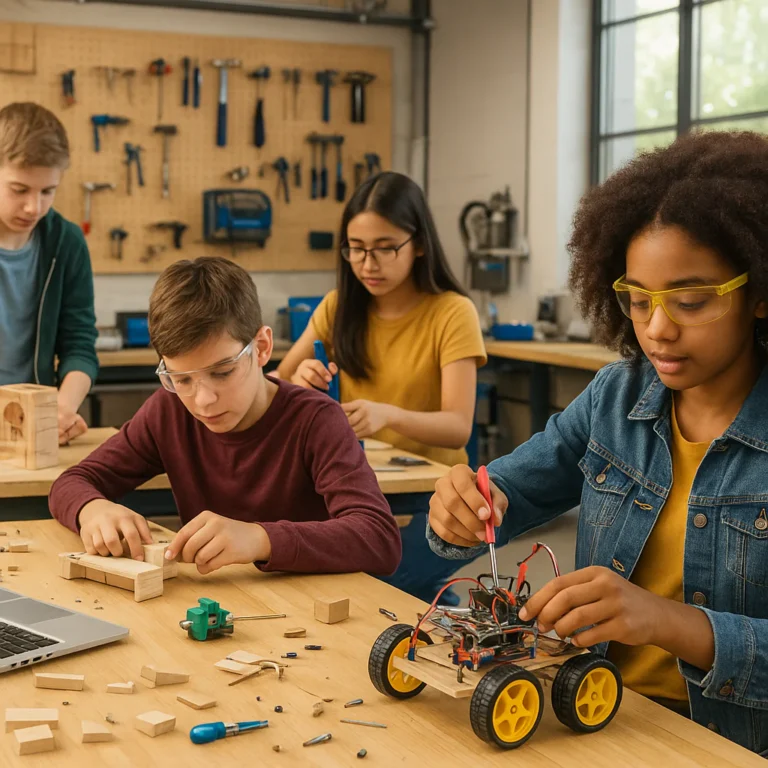
Imagine a classroom where the air hums with the sound of spinning gears and the occasional “It works!” cheer. Last year, we watched a group of reluctant 6th graders, who usually tuned out during math, spend three hours debugging a LEGO SPIKE Prime robot that kept crashing into a wall. They weren’t just fixing code; they were mastering geometry, physics, and resilience without even realizing it.
Research from the National Science Foundation supports this hands-on approach, showing that students engaged in physical robotics retain 20% more computational concepts than those using screen-only tools. But how do you manage the chaos? Which kit actually lasts? And how do you move beyond “press and go” to deep learning?
We’ve broken down the exact roadmap, from the best hardware for every budget to the pedagogical tricks that keep the noise productive. Whether you are a seasoned STEM coordinator or a teacher trying robotics for the first time, this guide covers the 12 essential strategies you need to build a future-ready classroom.
Key Takeaways
- Embrace the “Messy Middle”: True learning occurs when robots fail; teach students to view debuging as a data-gathering process, not a mistake.
- Start with Pairs, Not Groups: The pair programming model (driver/navigator) ensures 10% active participation and prevents one student from dominating the build.
- Scaffold from Screen-Free to Text: Begin with physical logic (like Botley 2.0) or block coding, then transition to Python or C++ only after concepts are mastered.
- Curiculum Integration is Key: Don’t treat robotics as an add-on; weave it into math, science, and art lessons to maximize impact and budget.
- Choose the Right Tool for the Job: Match the hardware to the student’s age and goal—LEGO SPIKE Prime for middle school engineering, Micro:bit for IoT, and Arduino for advanced makers.
👉 Shop Top Robotics Categories:
- LEGO Education Kits: Amazon | LEGO Official
- VEX Robotics Systems: Amazon | VEX Official
- Micro:bit & Arduino: Amazon | Micro:bit Official | Arduino Official
Table of Contents
- ⚡️ Quick Tips and Facts
- 📜 From Punch Cards to Programmable Bots: A Brief History of Robotics in Education
- 🤖 Why Teach Coding with Hardware? The Unbeatable Power of Tangible Learning
- 🛠️ Top 12 Robotics and Hardware Kits for the Classroom (and Home Lab)
- 1. LEGO Education SPIKE Prime: The All-Rounder Champion
- 2. VEX IQ: The Competitive Classroom Powerhouse
- 3. Micro:bit: The Pocket-Sized Code Starter
- 4. Arduino Starter Kits: For the DIY Tinker
- 5. Sphero BOLT: Rolling into STEM with Style
- 6. Makeblock mBot: Budget-Friendly Coding Fun
- 7. Dash and Dot: The First Steps for Little Coders
- 8. Botley 2.0: Screen-Free Coding Magic
- 9. Raspberry Pi Pico: Microcontroller Mastery
- 10. Cubetto: Coding for the Pre-Readers
- 1. Humingbird Bit: Bridging Art and Engineering
- 12. Thymio II: The Open-Source Research Robot
- 🧩 Curriculum Integration: How to Embed Robotics into Your Existing Lesson Plans
- 🎓 Pedagogical Strategies: Moving Beyond “Press and Go” to Deep Computational Thinking
- 🏆 Structuring the Ultimate Robotics Challenge: From Design to Debuging
- 👩 🏫 Teacher Survival Guide: Managing the Chaos of a Robot-Filled Classroom
- 💡 Troubleshooting 101: When Your Bot Refuses to Move (and How to Fix It)
- 📊 Comparing Block-Based vs. Text-Based Coding in Robotics Environments
- 🌍 Real-World Applications: Connecting Classroom Bots to Future Careers
- 🚀 Conclusion
- 🔗 Recommended Links
- ❓ FAQ
- 📚 Reference Links
⚡️ Quick Tips and Facts
Before we dive into the nitty-gritty of gears, wires, and loops, let’s get the “aha!” moments out of the way. At Teacher Strategies™, we’ve seen classrooms transform from quiet rows of desks into buzzing hubs of engineering innovation, but it doesn’t happen by magic. It happens by design.
Here are the non-negotiables for success when introducing robotics:
- The “Messy Middle” is Real: Your students will break things. A motor will burn out, a wheel will fall off, and a sensor will go haywire. This is not failure; it is data. Embrace the chaos. The best learning happens when the robot refuses to move and the class has to figure out why.
- Start with the “Why”: Don’t just hand out kits. Ask, “How can we make this robot avoid a wall?” before showing them the code. Context drives engagement.
- Pair Up, Don’t Group Up: While groups of three or four sound great for management, pairs are the sweet spot for robotics. One student holds the controller, the other holds the laptop. They switch roles every 15 minutes. This ensures active participation rather than one student doing all the work while the others watch.
- Screen-Free First: Believe it or not, some of the best coding concepts are taught without a single screen. Use floor robots or even just paper grids to teach sequencing and debugging before a line of code is written.
Did you know? According to a study by the National Science Foundation, students who engage in hands-on robotics projects show a 20% increase in retention of computer science concepts compared to those who only use screen-based simulations.
If you’re wondering how to manage the noise level while keeping the energy high, we’ve got a whole section on that later. But first, let’s look at where we came from to understand where we’re going.
📜 From Punch Cards to Programmable Bots: A Brief History of Robotics in Education

You might think robotics in schools is a 21st-century phenomenon, but the roots go back much deeper than you’d expect. The journey from punch cards to programmable bots is a story of democratization.
In the 1960s, Seymour Papert, a mathematician and educator, introduced the Logo programming language. He didn’t just want kids to type code; he wanted them to control a physical “turtle” that moved across the floor. This was the genesis of tangible learning—the idea that abstract concepts become concrete when you can see them move in the real world.
Fast forward to the 190s, and LEGO entered the chat. The introduction of LEGO Mindstorms in 198 was a watershed moment. Suddenly, you could build a robot, program it, and watch it drive across your classroom floor. It wasn’t just a toy; it was a computational thinking engine disguised as play.
Teacher Story: I remember my first year teaching with a clunky, brick-heavy Mindstorms kit. A student named Leo, who rarely spoke in class, built a robot that could sort blocks by color. When it worked, he didn’t just smile; he shouted, “It’s alive!” That moment taught me that robotics isn’t about the hardware; it’s about the spark in the student’s eyes.
Today, we’ve moved from proprietary, expensive systems to open-source platforms like Arduino and Raspberry Pi, and affordable, robust kits like VEX and Sphero. The barrier to entry has never been lower, but the pedagogical challenge remains: How do we move students from “press and go” to deep computational thinking?
For more on how to integrate these historical concepts into modern lesson plans, check out our guide on Critical Thinking.
🤖 Why Teach Coding with Hardware? The Unbeatable Power of Tangible Learning
Why not just use a simulator? Why drag heavy boxes of motors and sensors into the classroom?
The answer lies in embodied cognition. When a student writes code on a screen, a bug is just a red squiggly line. When a student writes code for a robot, a bug means the robot crashes into the wall, spins in circles, or refuses to move. The feedback is immediate, physical, and unforgettable.
The Benefits of Hardware-Based Coding
- Tangible Feedback: Students see the direct cause-and-effect relationship between their code and the physical world.
- Problem-Solving Skills: Debuging a physical robot requires a different set of skills than debugging a website. You have to check sensors, battery levels, and mechanical connections.
- Collaboration: Robotics projects naturally foster collaborative learning. Students must communicate to solve mechanical and software issues simultaneously.
- Engagement: Let’s be honest, kids love robots. It’s the “hook” that gets reluctant learners interested in STEM.
The Drawbacks (and How to Mitigate Them)
- Cost: Hardware can be expensive. Mitigation: Start with low-cost options like Micro:bit or Arduino, or seek grants.
- Maintenance: Things break. Mitigation: Build a “spare parts” bin and teach students basic repair skills.
- Classroom Management: It can get loud and chaotic. Mitigation: Establish strict protocols for “robot zones” and “quiet zones.”
For strategies on managing a high-energy classroom, read our article on Classroom Management.
🛠️ Top 12 Robotics and Hardware Kits for the Classroom (and Home Lab)
We’ve tested, broken, and rebuilt dozens of kits. Here is our definitive ranking based on ease of use, educational value, durability, and curiculum support.
Rating Criteria
| Aspect | Scale (1-10) | Description |
|---|---|---|
| Design | 1-10 | Build quality, ease of assembly, and modularity. |
| Functionality | 1-10 | Range of sensors, motors, and capabilities. |
| Software | 1-10 | Quality of the coding environment (blocks vs. text). |
| Curiculum | 1-10 | Availability of lesson plans and teacher resources. |
| Durability | 1-10 | Ability to withstand student handling. |
1. LEGO Education SPIKE Prime: The All-Rounder Champion
Rating:
- Design: 9/10
- Functionality: 9/10
- Software: 10/10
- Curriculum: 10/10
- Durability: 8/10
Analysis:
The SPIKE Prime is the gold standard for middle school. It bridges the gap between the simplicity of LEGO WeDo and the complexity of SPIKE Essential. The hub is powerful, and the block-based coding (based on Scratch) is intuitive. The text-based coding (Python) option allows for a smooth transition to advanced concepts.
Pros:
- Incredible ecosystem of lesson plans aligned with NGSS and CSTA standards.
- Durable, color-coded parts that are easy to organize.
- Seamless transition from blocks to Python.
Cons:
- Expensive initial investment.
- Parts can be lost easily if not strictly managed.
Best For: Grades 6-8, competitive robotics teams, and schools with a budget.
👉 Shop LEGO Education SPIKE Prime on:
- LEGO Education Official: LEGO Education SPIKE Prime
- Amazon: LEGO Education SPIKE Prime Set
2. VEX IQ: The Competitive Classroom Powerhouse
Rating:
- Design: 9/10
- Functionality: 9/10
- Software: 8/10
- Curriculum: 9/10
- Durability: 10/10
Analysis:
VEX IQ is built like a tank. It’s the go-to for VEX Robotics Competition teams. The plastic construction is incredibly robust, and the smart motors are precise. The VEXcode IQ software supports both blocks and C++.
Pros:
- Extremely durable; survives drops and takedowns.
- Strong community support and competition structure.
- Excellent for teaching engineering design processes.
Cons:
- The learning curve for C++ can be steep for beginners.
- Parts are proprietary (you can’t easily mix with other brands).
Best For: Grades 4-8, competitive teams, and schools focused on engineering.
👉 Shop VEX IQ on:
- VEX Robotics Official: VEX IQ Robotics Kit
- Amazon: VEX IQ Robotics Kit
3. Micro:bit: The Pocket-Sized Code Starter
Rating:
- Design: 8/10
- Functionality: 7/10
- Software: 10/10
- Curriculum: 9/10
- Durability: 7/10
Analysis:
The BBC Micro:bit is a tiny computer that packs a punch. It’s perfect for introducing IoT (Internet of Things) concepts. With built-in LEDs, buttons, and sensors, it’s ready to code out of the box.
Pros:
- Extremely affordable.
- Huge variety of add-on boards (shields) for expansion.
- Excellent browser-based editor.
Cons:
- Requires external batteries or a power bank for mobility.
- Less “robotic” out of the box; needs a chassis or robot kit to move.
Best For: Grades 3-7, introductory coding, and IoT projects.
👉 Shop Micro:bit on:
- Micro:bit Official: Micro:bit V2
- Amazon: Micro:bit V2
4. Arduino Starter Kits: For the DIY Tinker
Rating:
- Design: 7/10
- Functionality: 10/10
- Software: 6/10
- Curriculum: 5/10
- Durability: 8/10
Analysis:
Arduino is the heart of the DIY movement. It’s open-source, cheap, and infinitely expandable. However, it requires more setup and a steeper learning curve.
Pros:
- Low cost and open-source.
- Massive community and library of code examples.
- Teaches real electronics (resistors, LEDs, sensors).
Cons:
- No “plug-and-play” robot chassis; you build from scratch.
- Requires knowledge of C++ (text-based coding).
- Can be intimidating for younger students.
Best For: High school students, makerspaces, and advanced hobbyists.
👉 Shop Arduino Starter Kits on:
- Arduino Official: Arduino Starter Kit
- Amazon: Arduino Starter Kit
5. Sphero BOLT: Rolling into STEM with Style
Rating:
- Design: 10/10
- Functionality: 8/10
- Software: 9/10
- Curriculum: 8/10
- Durability: 9/10
Analysis:
Sphero BOLT is a programmable ball with an LED matrix. It’s great for teaching geometry, math, and coding in a fun, mobile way.
Pros:
- Durable and waterproof.
- Engaging LED matrix for visual feedback.
- Excellent app-based coding interface.
Cons:
- Limited to rolling movement (no arms or complex mechanisms).
- Battery life can be short with heavy use.
Best For: Grades K-6, math integration, and quick coding activities.
👉 Shop Sphero BOLT on:
- Sphero Official: Sphero BOLT
- Amazon: Sphero BOLT
6. Makeblock mBot: Budget-Friendly Coding Fun
Rating:
- Design: 8/10
- Functionality: 8/10
- Software: 8/10
- Curriculum: 7/10
- Durability: 8/10
Analysis:
The mBot is a fantastic entry-level robot. It’s affordable, easy to assemble, and supports both mBlock (Scratch-based) and C++.
Pros:
- Great price point for schools with limited budgets.
- Simple assembly process.
- Good balance of hardware and software.
Cons:
- Motors can be a bit weak for heavy loads.
- Software can be slightly buggy on older devices.
Best For: Grades 3-8, budget-conscious schools.
👉 Shop Makeblock mBot on:
- Makeblock Official: mBot
- Amazon: Makeblock mBot
7. Dash and Dot: The First Steps for Little Coders
Rating:
- Design: 9/10
- Functionality: 7/10
- Software: 9/10
- Curriculum: 9/10
- Durability: 9/10
Analysis:
Dash and Dot by Wonder Workshop are designed for the youngest learners. They are colorful, friendly, and incredibly durable.
Pros:
- Perfect for pre-readers and early elementary.
- No assembly required; ready to play.
- Excellent app with gamified learning.
Cons:
- Limited advanced capabilities (no complex sensors or text coding).
- Can be expensive for the feature set.
Best For: Grades K-2, early childhood education.
👉 Shop Dash and Dot on:
- Wonder Workshop Official: Dash and Dot
- Amazon: Dash and Dot
8. Botley 2.0: Screen-Free Coding Magic
Rating:
- Design: 8/10
- Functionality: 6/10
- Software: 10/10 (Screen-free)
- Curriculum: 7/10
- Durability: 9/10
Analysis:
Botley 2.0 is a screen-free robot that teaches coding logic without a computer or tablet. It’s perfect for schools trying to limit screen time.
Pros:
- No screens required; uses a remote programmer.
- Great for teaching sequencing and loops.
- Durable and kid-friendly.
Cons:
- Limited to pre-programed commands; no custom code.
- Not suitable for advanced coding concepts.
Best For: Grades K-3, screen-free learning environments.
👉 Shop Botley 2.0 on:
- Learning Resources Official: Botley 2.0
- Amazon: Botley 2.0
9. Raspberry Pi Pico: Microcontroller Mastery
Rating:
- Design: 7/10
- Functionality: 9/10
- Software: 7/10
- Curriculum: 6/10
- Durability: 8/10
Analysis:
The Raspberry Pi Pico is a low-cost microcontroller that runs MicroPython. It’s a great alternative to Arduino for those who prefer Python.
Pros:
- Very affordable.
- Supports MicroPython and C++.
- Strong community support.
Cons:
- Requires external components for robotics.
- Steper learning curve than block-based systems.
Best For: High school students, Python learners, and advanced makers.
👉 Shop Raspberry Pi Pico on:
- Raspberry Pi Official: Raspberry Pi Pico
- Amazon: Raspberry Pi Pico
10. Cubetto: Coding for the Pre-Readers
Rating:
- Design: 9/10
- Functionality: 6/10
- Software: 10/10 (Physical blocks)
- Curriculum: 8/10
- Durability: 9/10
Analysis:
Cubetto is a wooden robot that teaches coding concepts to children as young as 3 using physical blocks.
Pros:
- No screens; purely tactile.
- Beautiful design and high-quality materials.
- Excellent for introducing sequencing and loops.
Cons:
- Limited to basic coding concepts.
- Expensive for the feature set.
Best For: Preschool and Kindergarten.
👉 Shop Cubetto on:
1. Humingbird Bit: Bridging Art and Engineering
Rating:
- Design: 8/10
- Functionality: 9/10
- Software: 8/10
- Curriculum: 8/10
- Durability: 7/10
Analysis:
Humingbird Bit is designed for STEAM (Science, Technology, Engineering, Arts, Math). It allows students to integrate art and creativity into their robotics projects.
Pros:
- Great for interdisciplinary projects.
- Supports a wide range of sensors and actuators.
- Excellent for creative expression.
Cons:
- Can be fragile if not handled carefully.
- Requires more setup than all-in-one kits.
Best For: Grades 4-12, STEAM integration, and art-focused projects.
👉 Shop Humingbird Bit on:
- MakeCode Official: Humingbird Bit
- Amazon: Humingbird Bit
12. Thymio II: The Open-Source Research Robot
Rating:
- Design: 8/10
- Functionality: 9/10
- Software: 7/10
- Curriculum: 6/10
- Durability: 8/10
Analysis:
Thymio II is an open-source robot designed for research and education. It’s highly customizable and supports multiple programming languages.
Pros:
- Open-source and highly customizable.
- Great for advanced students and research.
- Strong sensor array.
Cons:
- Step learning curve.
- Limited commercial support compared to LEGO or VEX.
Best For: High school and university students, research projects.
👉 Shop Thymio II on:
🧩 Curriculum Integration: How to Embed Robotics into Your Existing Lesson Plans
You don’t need to throw out your entire curriculum to add robotics. In fact, the best approach is to weave it in.
Step-by-Step Integration Strategy
- Identify the Core Concept: Are you teaching loops? Variables? Geometry? Physics?
- Select the Right Kit: Match the kit to the concept. Use Sphero for geometry, LEGO for engineering, Micro:bit for sensors.
- Design the Challenge: Create a problem that requires the concept to solve. “How can we make the robot draw a perfect square?”
- Scaffold the Learning: Start with a guided activity, then move to open-ended exploration.
- Assess the Learning: Use rubrics that assess both the code and the physical outcome.
Example: Integrating Robotics into Math
- Concept: Angles and Geometry.
- Activity: Program a robot to draw a polygon.
- Challenge: “Can you make the robot draw a hexagon? What angle do you need to turn?”
- Outcome: Students visualize angles and understand the relationship between code and geometry.
For more on adapting lessons for different learners, check out our Differentiated Instruction guide.
🎓 Pedagogical Strategies: Moving Beyond “Press and Go” to Deep Computational Thinking
It’s easy to get stuck in the “press and go” trap: students follow a tutorial, make the robot move, and call it a day. But true learning happens when they have to debug, iterate, and create.
The 5E Model in Robotics
- Engage: Hook students with a real-world problem. “How can we help a farmer sort crops?”
- Explore: Let students play with the robots and sensors. No instructions yet!
- Explain: Introduce the concepts (loops, conditionals) based on what they discovered.
- Elaborate: Challenge them to apply the concepts to a new problem.
- Evaluate: Assess their understanding through a final project or presentation.
The Power of “Failure”
Encourage a growth mindset. When a robot fails, ask:
- “What did you expect to happen?”
- “What actually happened?”
- “What does the difference tell us?”
This turns failure into a learning opportunity. For more on fostering critical thinking, visit our Critical Thinking category.
🏆 Structuring the Ultimate Robotics Challenge: From Design to Debuging
A well-structured challenge can transform a classroom. Here’s how to build one:
The Challenge Framework
- The Problem: Define a clear, real-world problem.
- The Constraints: Set limits (time, materials, budget).
- The Criteria: Define what success looks like.
- The Process: Guide students through the engineering design process.
- The Reflection: Have students document their journey and lessons learned.
Example Challenge: The Maze Runner
- Problem: Navigate a maze without touching the walls.
- Constraints: Use only ultrasonic sensors. Time limit: 10 minutes.
- Criteria: Complete the maze in under 2 minutes.
- Process: Design, build, code, test, iterate.
- Reflection: What worked? What didn’t? How would you improve?
👩 🏫 Teacher Survival Guide: Managing the Chaos of a Robot-Filled Classroom
Let’s be honest: robotics can get loud. Here’s how to keep it under control.
Classroom Management Tips
- The “Robot Zone”: Designate a specific area for building and testing.
- The “Quiet Zone”: Keep a separate area for coding and planning.
- The “Stop” Signal: Establish a clear signal (e.g., a hand raise or a sound) to stop all activity immediately.
- The “Spare Parts” Bin: Have a dedicated bin for loose parts to prevent loss.
- The “Debuging” Log: Have students document their errors and solutions.
For more on managing a dynamic classroom, read our Classroom Management guide.
💡 Troubleshooting 101: When Your Bot Refuses to Move (and How to Fix It)
Nothing kills the vibe faster than a robot that won’t move. Here’s a quick troubleshooting checklist:
- Check the Power: Is the battery charged? Are the connections secure?
- Check the Motors: Are the motors plugged in correctly? Are they spinning freely?
- Check the Code: Is the robot programmed to move? Are there any syntax errors?
- Check the Sensors: Are the sensors blocked or dirty?
- Check the Wheels: Are the wheels stuck or misaligned?
Pro Tip: Teach students to use the “divide and conquer” method. Test one component at a time to isolate the issue.
📊 Comparing Block-Based vs. Text-Based Coding in Robotics Environments
Choosing between block-based and text-based coding can be tricky. Here’s a breakdown:
| Feature | Block-Based Coding | Text-Based Coding |
|---|---|---|
| Ease of Use | High (Drag and drop) | Low (Syntax errors) |
| Learning Curve | Low | High |
| Flexibility | Limited | High |
| Best For | Beginners, K-8 | Advanced, High School+ |
| Examples | Scratch, VEXcode Blocks | Python, C++ |
Recommendation: Start with block-based coding to build confidence, then transition to text-based coding as students master the concepts.
🌍 Real-World Applications: Connecting Classroom Bots to Future Careers
Robotics isn’t just about fun; it’s about preparing students for the future.
- Manufacturing: Industrial robots are used in assembly lines.
- Healthcare: Surgical robots assist in complex procedures.
- Agriculture: Autonomous tractors and drones monitor crops.
- Space Exploration: Rovers explore Mars and other planets.
By teaching robotics, you’re giving students the skills they need for these careers. For more on career connections, check out our Collaborative Learning resources.
🚀 Conclusion
We’ve journeyed from the punch cards of the past to the programmable bots of today, exploring the unbeatable power of tangible learning. We’ve looked at the top 12 kits, from the all-rounder LEGO SPIKE Prime to the budget-friendly Makeblock mBot, and discussed how to integrate them into your curriculum.
But the real question remains: How will you use robotics to transform your classroom?
Will you start with a simple Botley 2.0 for your youngest learners, or dive straight into Arduino with your high schoolers? Will you focus on competition or creative expression? The choice is yours, but one thing is certain: robotics is not just a tool; it’s a catalyst for deep, meaningful learning.
So, go ahead. Grab a kit, build a robot, and watch your students’ eyes light up. The future is in their hands (and their code).
🔗 Recommended Links
Shopping for Robotics Kits
- LEGO Education SPIKE Prime: LEGO Education Official | Amazon
- VEX IQ: VEX Robotics Official | Amazon
- Micro:bit: Micro:bit Official | Amazon
- Arduino Starter Kit: Arduino Official | Amazon
- Sphero BOLT: Sphero Official | Amazon
- Makeblock mBot: Makeblock Official | Amazon
- Dash and Dot: Wonder Workshop Official | Amazon
- Botley 2.0: Learning Resources Official | Amazon
- Raspberry Pi Pico: Raspberry Pi Official | Amazon
- Cubetto: Cubetto Official | Amazon
- Humingbird Bit: MakeCode Official | Amazon
- Thymio II: Thymio Official | Amazon
Recommended Books
- “Robotics for Kids: A Hands-On Guide to Building and Programming Robots” by [Author Name] – Amazon
- “The Art of Electronics” by Paul Horowitz and Winfield Hill – Amazon
- “Python for Kids: A Playful Introduction to Programming” by Jason R. Briggs – Amazon
❓ FAQ
How can robotics kits be integrated into existing K-12 computer science curicula?
Robotics kits can be seamlessly integrated by aligning them with computational thinking standards. Start by identifying the core concepts in your curriculum (e.g., loops, conditionals, variables) and then design robotics challenges that require students to apply these concepts. For example, use LEGO SPIKE Prime to teach loops by having students program a robot to repeat a movement. Use Micro:bit to teach variables by having students create a robot that counts steps. The key is to scaffold the learning, starting with simple challenges and gradually increasing complexity.
What are the most effective hardware kits for introducing coding concepts to elementary students?
For elementary students, screen-free and block-based kits are most effective. Botley 2.0 is excellent for pre-readers, as it teaches sequencing without a screen. Dash and Dot are perfect for grades K-2, offering a fun, engaging way to learn basic coding concepts. For grades 3-5, LEGO WeDo or Makeblock mBot provide a good balance of building and coding. These kits are intuitive, durable, and have excellent curriculum support.
How do teachers assess student learning when using robotics for coding instruction?
Assessment should go beyond just checking if the robot works. Use rubrics that evaluate:
- Code Quality: Is the code efficient and well-structured?
- Problem-Solving: How did the student approach the challenge?
- Collaboration: Did the student work well with their team?
- Reflection: Can the student explain their process and what they learned?
- Final Product: Does the robot meet the challenge criteria?
Read more about “Kindergarten Success: 10 Essential Strategies! 🍎”
What are common challenges in teaching coding with robotics and how can they be overcome?
Common challenges include cost, maintenance, and classroom management.
- Cost: Seek grants, use low-cost kits like Micro:bit or Arduino, or start with a single kit and rotate.
- Maintenance: Build a “spare parts” bin and teach students basic repair skills.
- Classroom Management: Establish clear rules, designate “robot zones,” and use a “stop” signal.
How can collaborative learning be fostered through robotics and hardware projects?
Collaborative learning is natural in robotics. Encourage pair programming, where one student codes while the other builds, and then they switch roles. Use group challenges that require different skills (e.g., one student focuses on the code, another on the mechanical design). Facilitate peer review sessions where students critique each other’s work. For more on this, check out our Collaborative Learning guide.
What professional development resources are available for educators teaching coding with robotics?
There are many resources available:
- Carnegie Mellon Robotics Academy: Offers training and certification for VEX educators.
- LEGO Education: Provides extensive lesson plans and teacher training.
- Code.org: Offers free courses and resources for teaching coding.
- Local Universities: Many universities offer workshops and summer institutes for educators.
- Online Communities: Join forums like Reddit’s r/robotics or Facebook groups for teachers.
How can low-cost or open-source hardware kits be used to teach coding strategies in underfunded classrooms?
Low-cost kits like Micro:bit, Arduino, and Raspberry Pi are perfect for underfunded classrooms. They are affordable, open-source, and have large communities for support. You can also use repurposed materials (e.g., cardboard, old toys) to build robot chassis. Focus on software-based simulations if hardware is limited, but try to get at least one physical kit for hands-on learning.
📚 Reference Links
- National Science Foundation: STEM Education Research
- Computer Science Teachers Association (CSTA): Standards
- LEGO Education: SPIKE Prime Resources
- VEX Robotics: VEX IQ Resources
- Micro:bit Foundation: Educational Resources
- Arduino: Education Resources
- Carnegie Mellon Robotics Academy: Training Programs
- Facebook Group: Digital Technologies Teachers Australia – What equipment and teaching methods to use for Lego Robotics
- Chief Delphi: FRC Programming Course Share Your Methods
- CMU Robotics Academy: VEX V5 Onsite Training